 Parcel Deed Input
Allows the input of deed calls (bearing/distance) along with curve options; the result of which is saved and drawn.
Keyboard Command: ParDedInp
Procedure:
- DS> Parcel Name <YYYYMMDDHHMMSSSS>: (enter a parcel name or press enter for the default).
- DS> Pick Starting Point: (enter or pick a starting point for the description)
- DS> Output File [D:\PATH\FILE.scr]: (the default output file is echoed, you can change this).
- DS> Bearing (QDD.MMSS) [Curve/End/File/Save/Undo]: (enter a bearing as a quadrant number followed by degrees as two numbers, a period, minutes as two numbers, seconds as two numbers). You can also enter one of the keywords shown or the first letter of the keyword.
- DS> Distance <0.0000>: (enter the distance for the line call).
Notes:
- To enter a curve, follow this procedure:
- Enter C at the primary prompt.
- Enter R for right or L for left turning direction.
- A list of parameter keywords is echoed, enter the two-character code for what is known:
DS> Bulge, Chord, Delta, Length, Radius, Tangent
DS> Method [BC/CD/CR/DL/DR/DT/LR/RT] <CR>
The options are as follows:
- Bulge - a mathematical value that defines the curvature of a polyline arc segment. It is calculated as the ratio of the arc’s sagitta (the distance from the midpoint of the chord to the arc) to half the length of the chord. Its numerical value determines the shape and direction of the curve:
- Bulge = 0: Represents a straight line segment.
- Bulge = 1: Creates a perfect semicircle.
- Positive Value (> 0): Creates an arc to the left of the segment (counterclockwise).
- Negative Value (< 0): Creates an arc to the right of the segment (clockwise).
- Values between 0 and 1: Create shallow arcs.
- Values greater than 1: Create arcs greater than a semicircle (bulging outward but extending more than 180°).
- Chord - Chord distance of the arc from its PC to its PT.
- Delta - Central angle of the arc in
DD.MMSSssformat. - Length - True length along the arc.
- Radius - Radius length of the arc.
- Tangent - Length from the PC/PT of the arc to its PI.
- Bulge - a mathematical value that defines the curvature of a polyline arc segment. It is calculated as the ratio of the arc’s sagitta (the distance from the midpoint of the chord to the arc) to half the length of the chord. Its numerical value determines the shape and direction of the curve:
- Enter the numeric value for the first character of the code (e.g. the Chord length for the default CR code).
- Enter the numeric value for the second character of the code (e.g. the Radius value for the default CR code)
- At the end (or anytime S is entered) the values entered are stored in a SCRipt file that can be replayed in the CAD engine. You can drag/drop this SCR file to an open notepad, make changes or append records. Be sure to erase any old parcel geometry before replaying the SCR file.
- At the end, closure information is echoed at the command prompt, it is also appended to the output (script) file.
Example:
(keyboard entry shown in bold)
| Command: ParDedInp DS> Parcel Name <2014083012555315>: DB1-PG1 DS> Starting Point: 10000,5000 DS> Output File [E:\CIVTOOLSX\DB1-PG1.scr] DS> Bearing (QDD.MMSS) [Curve/End/File/Save/Undo]: 145.1010 DS> Distance <0.0000>: 200 DS> Bearing (QDD.MMSS) [Curve/End/File/Save/Undo]: C DS> Turning [Left/Right] <Right>: R DS> Bulge, Chord, Delta, Length, Radius, Tangent DS> Method [BC/CD/CR/DR/DL/DT/LR/RT] <CR>: CR DS> Parameter One <0.0000>: 200 DS> Parameter Two <0.0000>: 100 DS> Bearing (QDD.MMSS) [Curve/End/File/Save/Undo]: 345.1045 DS> Distance <200.0000>: 199 DS> Bearing (QDD.MMSS) [Curve/End/File/Save/Undo]: 445.1500 DS> Distance <199.0000>: 199.5 DS> Bearing (QDD.MMSS) [Curve/End/File/Save/Undo]: E DS> CloAzi: 359°29'10" CloDis: 0.6591 DS> TotDis: 912.6593 CloRat: 1/1385 DS> Output file created/updated. |
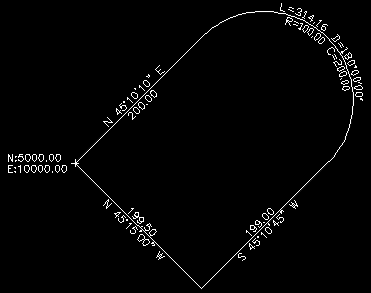 |
The actual script file would resemble:
ParDedInp
DB1-PG1
10000,5000
145.1010
200
C
R
CR
200
100
345.1045
199
445.1500
199.5
E