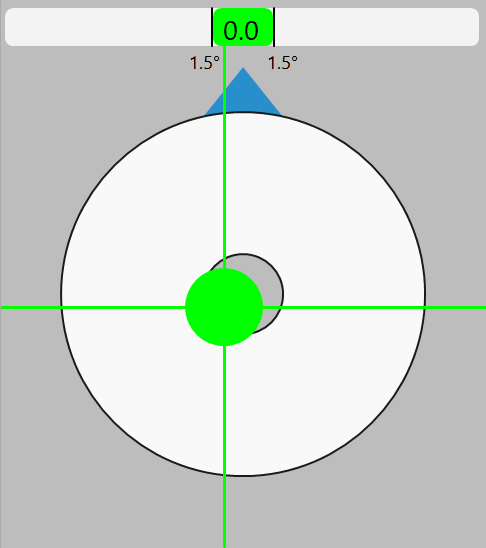
The target view provides real-time visual guidance for positioning and orienting the vehicle to meet the required tolerances for pile placement. The target view captures two different tolerances:
The above picture shows the target view with every aspect within tolerance.
The operator must ensure all indicators are green before confirming final pile placement.
Clicking/Tapping on the target view will bring up the Target View Settings to change options relating to the target view.
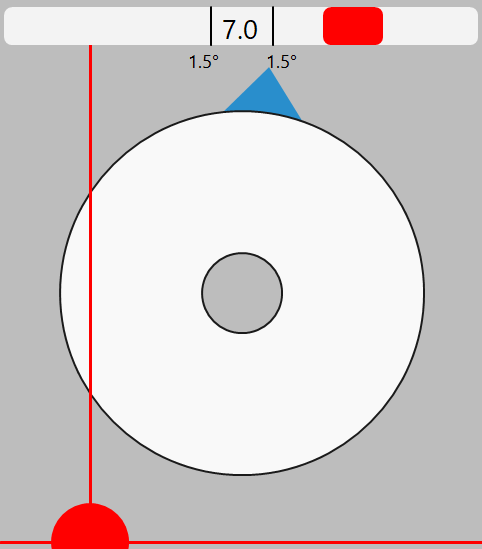
The slider displays the deviation of the current vehicle heading from the target heading. In the above picture, the 1.5° boundaries represent the allowable deviation from the target heading.
The blue triangle located on top of the bullseye bubble level is also an indicator for the heading. This triangle rotates around the top half of the bullseye. When the heading is correct, the triangle will be centered horizontally and the top slider will turn green.
Note: When the bubble and vertical/horizontal lines are centered and turn green, the vehicle is within tolerance of the target pile position.