Found in Reporting->Density/AUF->Output->Schedule
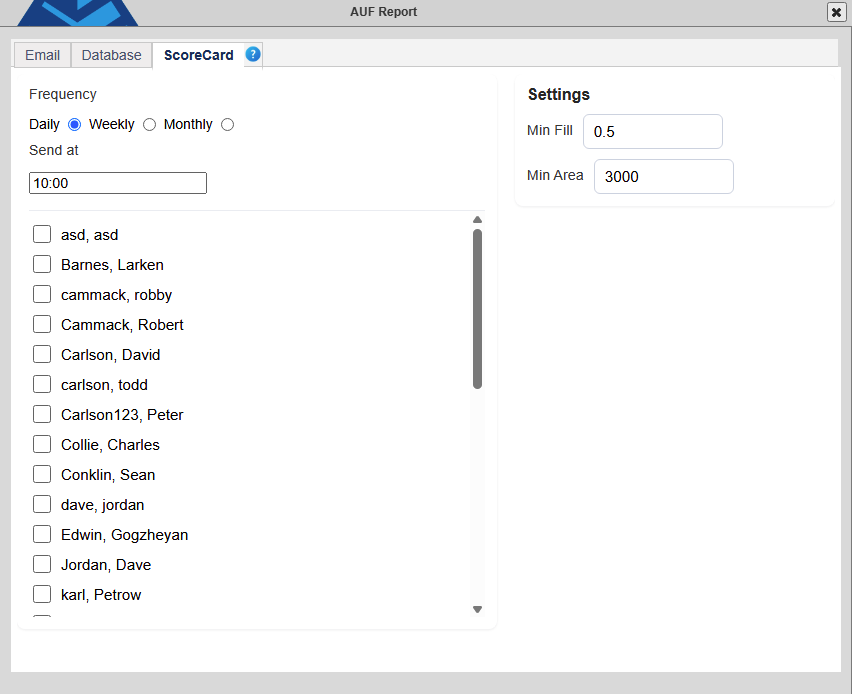
Frequency
Select the time period for the report to run.
- Daily - Will send a report for each day the next day at the configured time.
- Weekly - Sends the report each week for one whole week Sunday to Sunday on the Next Monday at the configured time.
- Monthly - Send the report for a month on the 1st of the next month at the configured time.
Settings
Configure the work zone settings for the Density and area calculations. These function in the same way as the Density Report Work Zone settings.
- Min Fill Depth – The minimum amount of fill depth that will be counted as part of the work zone. Adjust this value based on the amount of waste placed over the time period. Increasing this value reduces the noise at the perimeter of the work zone by increasing the amount of fill necessary to be included in the calculations. Adjusting this number too high can cause legitimate fill to be missed. .5ft -1ft ( .1-.3 M) Is a typical setting for a 1000 ton day.
- Min fill Area – The smallest area that will be counted as part of the work zone. This setting disqualifies separate areas that do not meet the minimum threshold from the calculations. This reduces noise in the number of different areas. 3000 Square ft (1000 M) is a typical setting for a 1000 ton day.
Users
Select the users to send the report to.
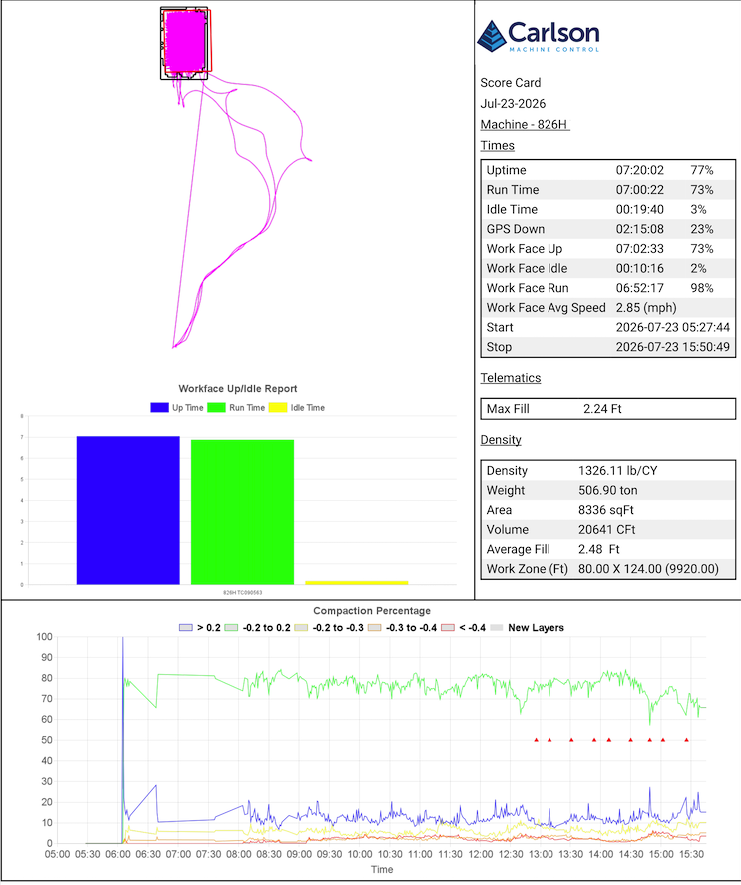
The Landfill ScoreCard Report is a type of summary report that combines the Density, Compaction by Deflection, and Uptime reports for a site by each compactor.
Times:
- Uptime - All of the time the Control box on the machine is powered on and Carlson Grade is running with Streaming enabled in Communication settings.
- Run Time - Time the machine is said to be "moving" based on the setting "Min Running Speed" in Settings → Limits.
- Idle Time - Time the machine is said to be "stopped" based on the setting "Min Running Speed" in Settings → Limits.
- GPS Down - Any time during a session where the GPS is not in a "Fixed" state, or a vital sensor such as a tilt sensor is offline.
- Work Face Up - Uptime for this machine while in the work face box.
- Work Face Idle - Idle time for this machine while in the work face box.
- Work Face Run - Run time for this machine while in the work face box.
- Work Face Avg Speed - The average speed of the machine while in the work face box.
- Start - The timestamp of the first power on for this machine for the time period.
- Stop -T he timestamp of the last power down for this machine for the time period.
Telematics:
- Max Fill - The highest amount of fill in the work face box over the specified time period.
Density:
- Density - The density of the as-placed waste within the work face box over the specified time period.
- Weight - The weight of the material over the specified time period. Found in the "Weights" button in the Command Header.
- Area - The area in square feet of fill in the work face area over the specified time period.
- Volume - The volume of airspace consumed by waste over the specified time period.
- Average Fill - The average fill height of was within the work face area
- Work Zones - An entry for each work zone that meet the minimum fill and area requirements of the report.
Compaction Percentage - The percent of the area in the work faces of each level of deflection. Deflection is the difference in the elevation of the surface at a point from one pass to the next. The colors are shown on a timeline of the time period run.

The colors represent different levels of compaction:
Blue - The surface raised up from one pass to the next.
Red, Orange, Yellow - The surface lowered from one pass to the next.
Green - The elevation did not change from one pass to the next (compacted).
Related Topics