Pile Reporting In Command
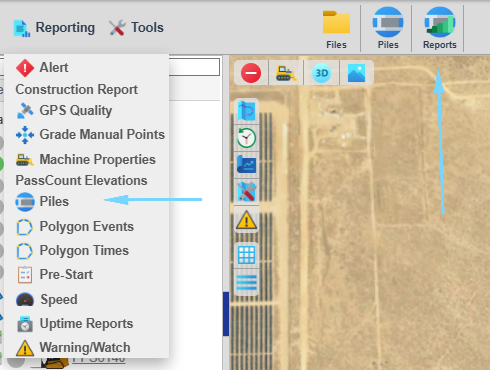
View and analyze the pile as-builts or designs from the Command>Reporting section. Selecting “Piles” from the drop down menu opens “Pile Reports” in the right panel menu.
Choose from the options and then press "Submit" in the Controls section to load piles into the map view and generate reports in the bottom panel.
Here are examples of common report set-ups:
- Actuals by date Example: all the piles piled yesterday.
- Select Dates
- Select all machines to include
- Select all folders
- Press "Submit"
- Full report on a block, section, or array (represented in Command as "folders")
- Turn off "Choose by Date" under "Dates"
- Select all machines
- Select just the folder to load
- Press "Submit"
- Fast Total
- Select Date
- Press the "Fast Total" button in the "Controls" section at the bottom.
Download Options will appear after the pile report is loaded into Command.
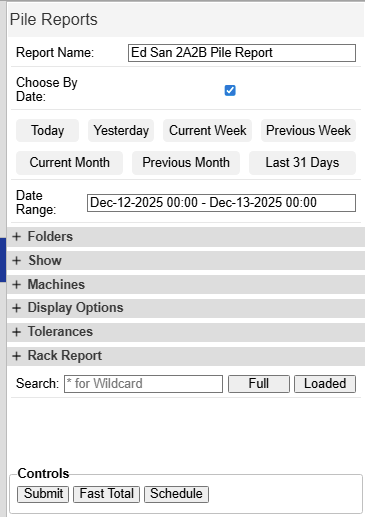
The Pile Reports menu is broken down into sections. Each section contains options that alter what is shown in the report. Navigate top to bottom through the sections to ensure the desired report is achieved.
Report Name - Add a title to any report downloaded from the menu.
Dates
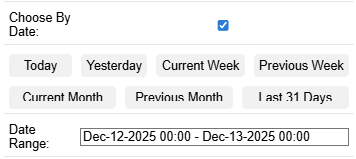
Set a start and end date for the report.
Choose by Date - If “Choose By Date” is not selected, piles are pulled from all dates. This is used to run a report from a particular pattern(s) regardless of when they were piled.