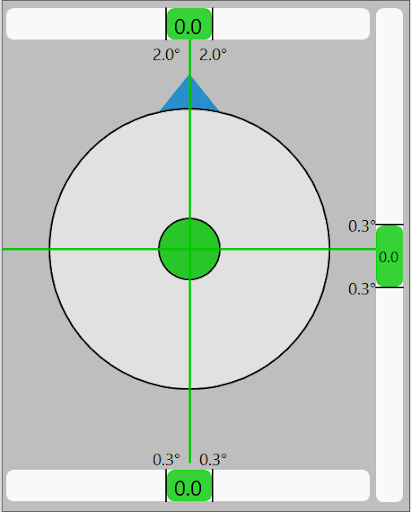
The target view provides real-time visual guidance for positioning and orienting the vehicle to meet the required tolerances for pile driving. The target view captures four different tolerances:
position
heading
roll
pitch
The above picture shows the target view with every aspect within tolerance.
The operator must ensure all indicators are green before confirming final pile placement.
Clicking/Tapping on the target view will bring up the Target View Settings to change options relating to the target view.
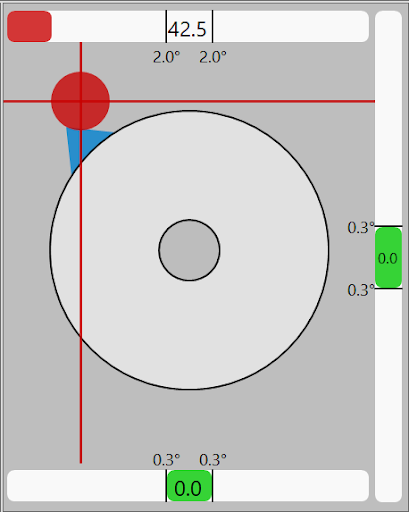
Position Tolerance: The circular bubble indicator represents the vehicle's horizontal and vertical displacement relative to the defined target pile's position. The vehicle's position is designated by the vertical and horizontal lines in conjunction with the dot. When these values are not within tolerance, the lines and dot will turn red and will offset depending on how far the vehicle is off target. An example of a target view with an out of tolerance position (and heading) can be seen below:
Position and Heading Indicators Out of Tolerance
Heading Tolerance: The top slider and the blue triangle located on the top half of the position bubble indicate the heading of the vehicle.
The slider displays the deviation of the current vehicle heading from the target heading. In the above picture, the 2.0° boundaries represent the allowable deviation from the target heading.
The blue triangle located on top of the bullseye bubble level is also an indicator for the heading. This triangle rotates around the top half of the bullseye. When the heading is correct, the triangle will be centered horizontally and the top slider will turn green.
Slider Position based on Operator Perspective: Depending on the operator orientation, the pitch and roll sliders will vary position based on the following:
Forward/Backward perspective: Pitch slider on right, roll slider on bottom.
Left/Right perspective: Pitch slider on bottom, roll slider on right.
Pitch Tolerance: The pitch slider indicates the rotation about the x-axis (forward/backward tilt). The position of this slider can be found by referencing the section Slider Position Based on Operator Perspective. The slider shows the current pitch angle and the deviation from the target angle. Like the heading slider, this slider will be green within tolerance, and red otherwise. This slider can be brought within tolerance by adjusting the mast of the vehicle.
Roll Tolerance: The Roll slider indicates the vehicle's rotation about the y-axis (left-to-right tilt). This slider shows the current roll angle of the vehicle and the deviation needed for the target pile's design. This slider is color coded similar to the other sliders in this view.
Note: When the bubble and vertical/horizontal lines are centered and turn green, the vehicle is within tolerance of the target pile position.