Alerts Tab
Alerts: Command reports Alerts that have been signaled by Carlson Grade on the Rovers. Alerts are any status in Grade that causes the status bar to flash Red to the operator. Alerts may be problems with communication to positioning sensors such as:
- No Position Data: No connection to a GPS receiver.
- Lost Lock:
- Autonomous: No RTK corrections received.
- Float: RTK corrections but no fixed position.
- No Sensor Input: No connection to axial sensors.
- No Sensor Data from Sensor (Sensor Name): The Sensor has gone offline.
- Warning/Caution:
- Proximity to another rover.
- Inside a Warning or Watch area.
- Above or below a warning surface.
- Bad Hardware ID: A machine is attempting to stream as a machine with the wrong hardware ID. Details like IP address and hardware ID of the offender are included.
More Information:
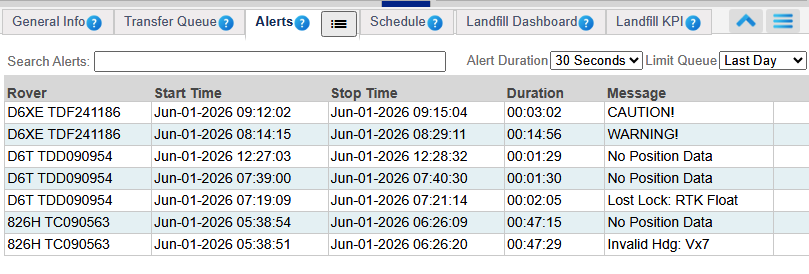 Alerts
- Machine: The name of the machine.
- Start Time: The time the alert began.
- Stop Time: The time the alert ended.
- Message: The alert message.
- Clear: Allows the user to manually clear the alert.
Note: The Alerts tab will only show the 'active' alerts, or alerts that are currently happening while all machines are selected in the Fleet Explorer. Select only some machines to see historical alerts, This will be limited to the last 100 alerts.