Pre-Start Checklist
Carlson Grade may be configured for operators to fill out a pre-start check list on login.
Options
This report will display the results of those checklists.
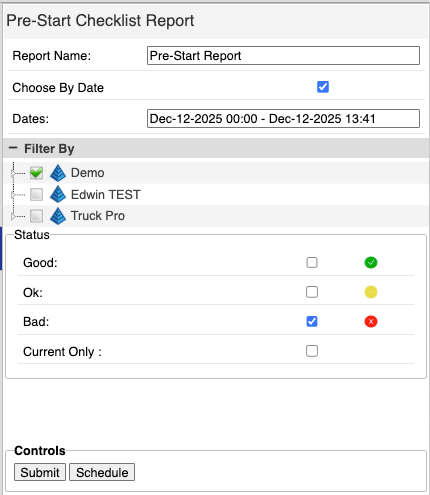
Prestart Report Menu
- Report Name: The name for the PDF and CSV downloads of the report output.
- Choose by Date: Optional. Select a date range to limit the time period for the completed checklists.
- Filter By:
- Machines: Select machines to include in the report.
- None: Select None to run the report for all machines.
- Status: Select what kinds of answers to include.
- Good: Include answers that were marked checked (green).
- OK: Include answers that were marked as an issue with notes (yellow).
- Bad: Include answers that were marked broken (red).
- Current Only: (need more here).
Output
Each machine included gets a tab in the bottom panel. Each tab contains all of the pre-start checklist instances for that machine in the selected time period.
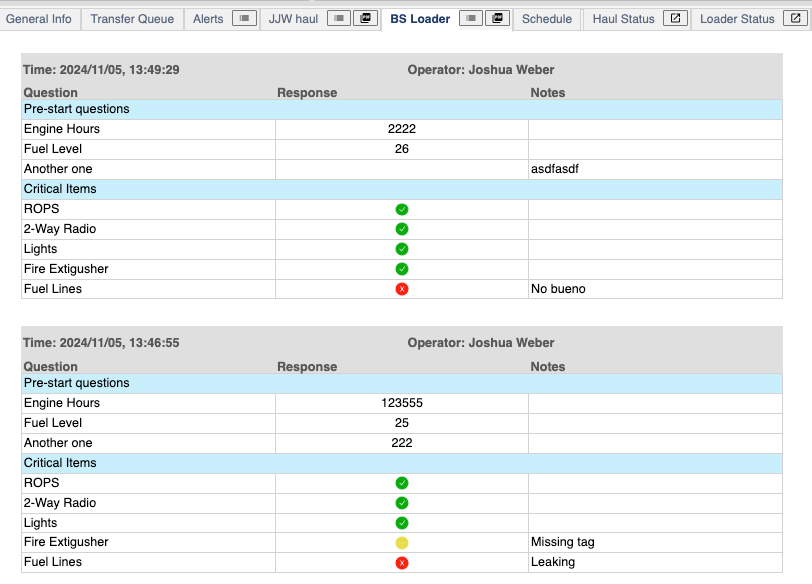
Pre-Start Checklist Table
- Time: Time stamp when the checklist was filled out.
- Operator: Operator who completed the checklist.
- Columns:
- Question: The prompt the operator responded to.
- Response: Either the input the operator typed in or the check mark they chose.
- Notes: Information provided by the operator (if any).