Import
To load designs into the Drill Command system, use the Import tab. First, select the desired import type from the dropdown menu.
CSV
The most common and flexible method for importing a design is using a CSV file.
To begin the import process, first select the target folder on the left-hand navigation tree. It is essential to choose a folder beforehand to ensure the design is imported to the correct location. Then, click the folder icon next to the "CSV File" input field to select the .csv file you wish to import.
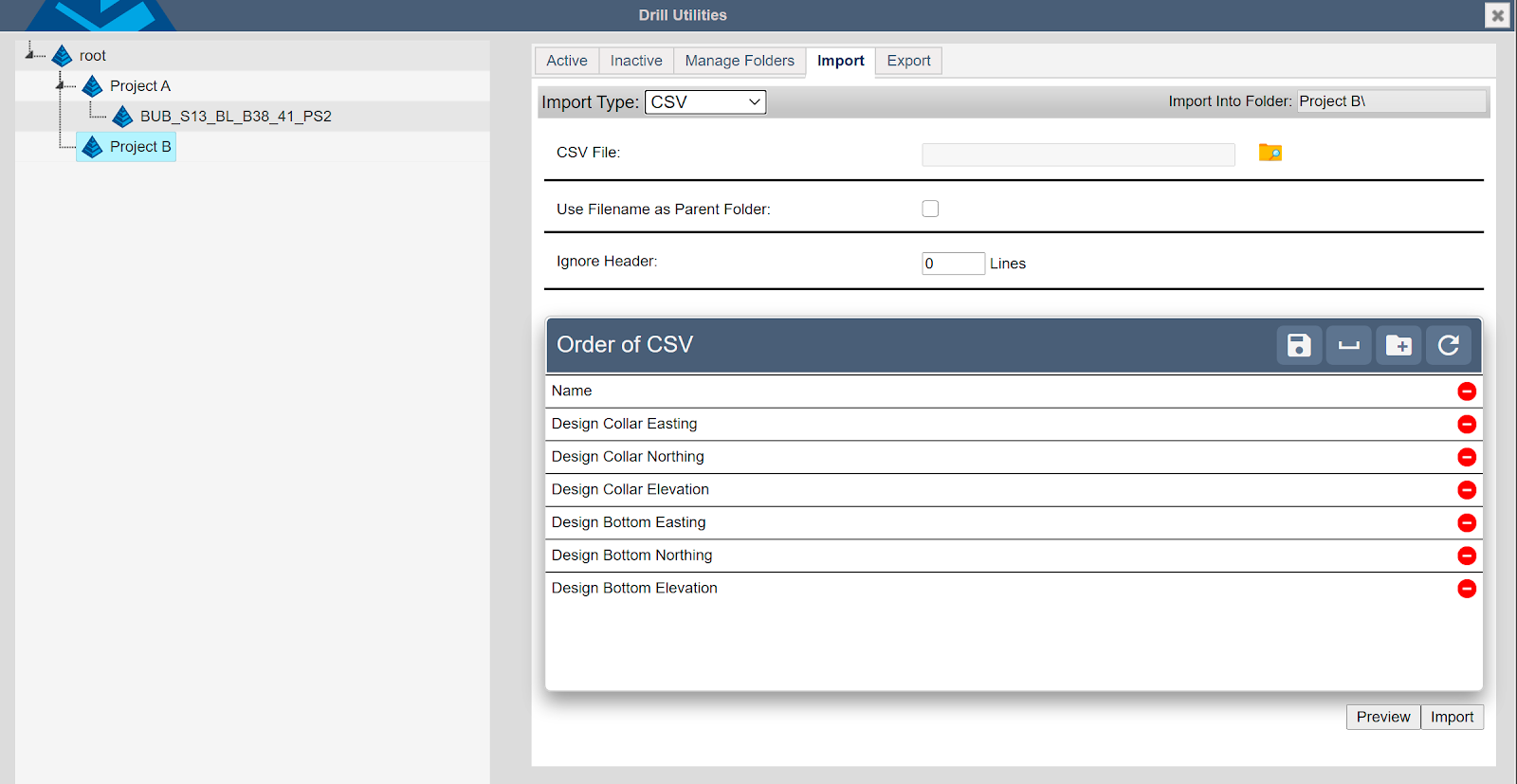
Import Options for Drill Designs
- Use Filename as Parent Folder: This option, which defaults to "checked" when importing into the root folder, creates a new folder named after the imported file. All designs must reside within a folder. If you wish to import designs into an existing folder (e.g., to update a design) or a previously created folder from the "Manage Folders" tab, you can select that folder on the left instead.
- Ignore Header: Specify the number of header lines in the .csv file to skip during import. This is typically set to 1 if a header line exists, or 0 if there is no header, preventing the header row from being imported as an invalid hole design.
Order of CSV
Because the CSV format is non-standard and its columns can represent any type of data, the order of the columns must be defined before the design can be imported. To match the sequence of the CSV file, drag and drop the available fields. The fields that need to be mapped are:
Name - The primary identifier of the hole.
Design Northing - The Y coordinate of the collar.
Design Easting - The X coordinate of the collar.
Design Collar Elevation - The Z coordinate of the collar.
Design Bottom Northing - The Y coordinate of the bottom.
Design Bottom Easting -The X coordinate of the bottom.
Design Bottom Elevation - The Z coordinate of the bottom.
Design Dip (degrees) - The angle at which the hole will be driven.
Design Azimuth (degrees) - Direction of the dip angle (direction of the row with vertical holes.)
Design Length - The length of the hole to drive.
Blast Direction - Azimuth in the direction of the blast.
Description - Any additional information or identification for the hole.
Bit Size - Bit size of the hole.
Drill holes must have one of these combinations to be valid:
- Collar N,E,Z and Bottom N,E,Z (recommended)
- Bottom N,E,Z, Azimuth(or blast direction), dip
- Collar N,E,Z, Azimuth (or blast direction), dip, bottom Z
Controls for CSV import are buttons at the right side of the CSV Order header.

- Save Order - This is a site wide setting. It is available only to Master users.
- Placeholder - Adds a field to ignore in the file.
- Add Folder - Adds a field where a nested folder name can be added.
- Refresh Order - Resets the order and fields to defaults.

Remove a field by clicking the red remove icon at the end of applicable fields.
Press “Preview” To ensure headers line up with data, and that there is no header line.
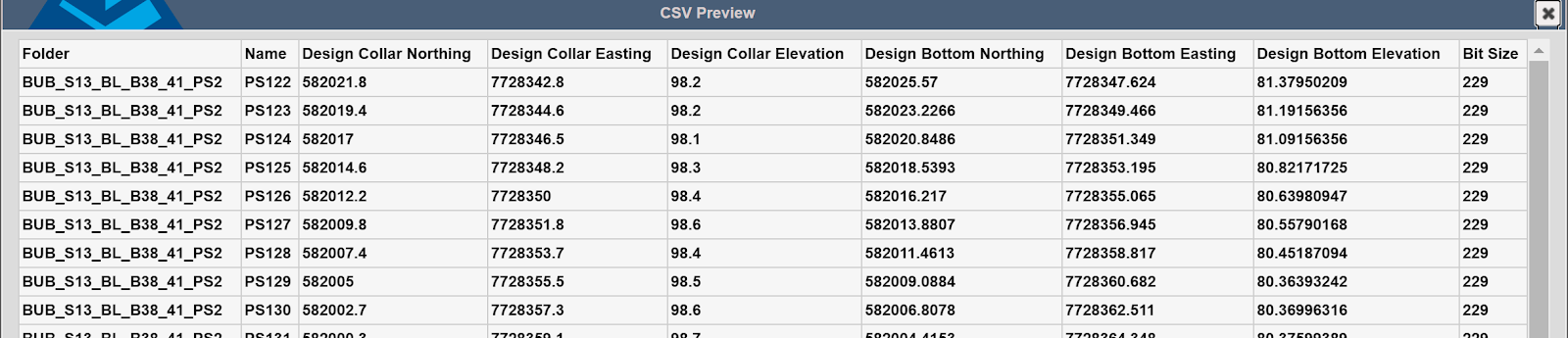
Upon pressing "Import," the new folder and the holes it contains will become active. The hole designs are automatically transferred to the drills.
DRL
To import drill designs, use the DRL Import format, which is a Carlson file type exportable from either DrillGrade or Command. This format is specifically for bringing a design pattern into the Drill Command system, typically when upgrading from an existing site. No initial configuration is required. Simply select the desired destination folder and click the "Import" button.
GRB Import
GRB is a proprietary format for drill designs. Command can import them without definitions.
Options:
- Socket Radius - Defines a 2D warning zone around the hole for future avoidance.
- Additional Sub Drill - Adds additional length to the imported holes.
IREDES Import
IREDES is an international standard format for drill hole design information. The Command program can easily import an IREDES file, requiring minimal setup. A useful feature allows for swapping the X and Y coordinate values during the import process.