Download Format
CSV
CSV Columns
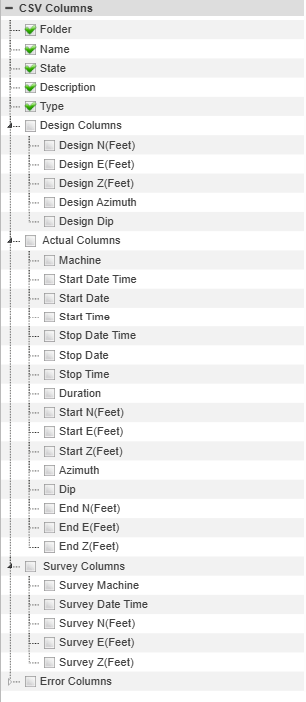
After the report is submitted there is an option to download the selected piles in CSV format. The CSV export is able to contain all of the raw data stored by Command for the piles.
Folder - The bottom level folder name containing the pile.
Name - The unique identifier for the pile within the folder.
State - The pile exists in one state of the pile cycle.
- Designed - The pile design exists but a machine has not interacted with it.
- Placed - A PD Placement machine has marked the pile placed. This means the pile should be at the location to be driven.
- Refused - marked as refused for time or height tolerance. This indicates the ground is too hard to drive the pile completely.
- Finished (piled) - Driven
- Reset - This means a Carlson PD machine has interacted with the pile in some way, but has set it back to an unfinished state.
- Surveyed - Driven and surveyed by PD Supervisor. A surveyed pile will have 2 actual coordinates. One for as-piled by the machine and one surveyed by a rover.
Design Columns - The coordinate, Azimuth, and Dip of the pile design.
Actual Columns - As-built data for the pile:
- Machine
- Start and Stop Time of piling
- Azimuth
- Start coordinate and dip
- End coordinate and dip
Error Columns - As-built deviation from design.
- N,E,Z Error
- Azimuth Error
- Dip Error
- N/S and E/W Plumb error Angle of the pile in the N/S or E/W directions
Pile Summary
Summary Metrics
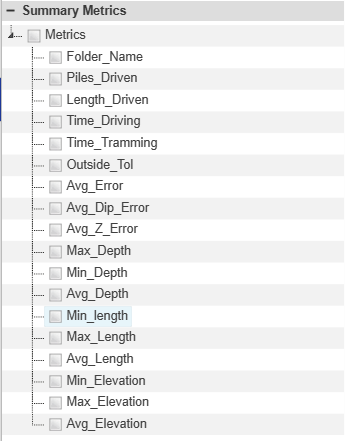
“Summary” report is an overall summary PDF file breakdown by machine.
Choose the summary metrics to view in the Summary PDF on download. Details on these metrics are provided in the Summary Report section.