Uptime Reports
Uptime reports are all of the time based reports broken down into industries for specific types of reports.
Terms
Uptime = Run Time + Idle Time + GPS Down
- Uptime: All of the time the Control box on the machine is powered on and Carlson Grade is running with Streaming enabled in Communication settings.
- Run Time: Time the machine is said to be "moving" based on the setting "Min Running Speed" in Settings → Limits.
- Idle Time: Time the machine is said to be "stopped" based on the setting "Min Running Speed" in Settings → Limits.
- GPS Down Time: Any time during a session where the GPS is not in a "Fixed" state, or a vital sensor such as a tilt sensor is offline.
- Session: One session of uptime from Grade start to Grade stop.
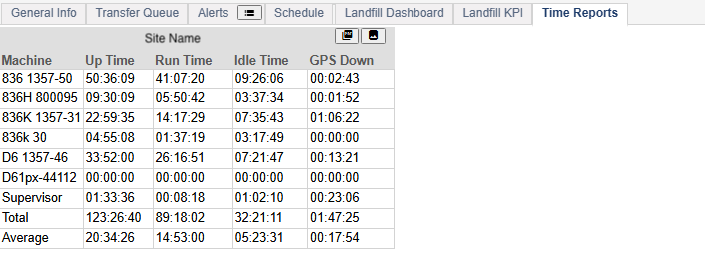
Uptime Report Table
Note: The switch between "Running Time" and "Idle Time" is based on the setting "Min Running Time" in Settings → Limits. A machine has to remain in one of the two states for at least this long for it to be considered a change in state.
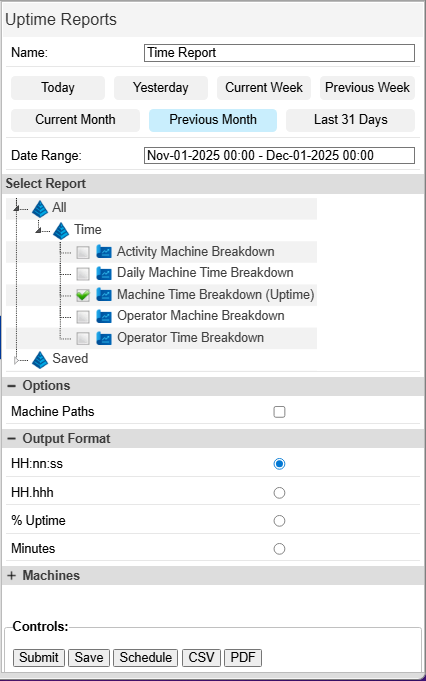
Uptime Report Menu
- Name: This is the name that appears on report outputs.
- Date Range: All time reports must be run over a time period. Set start and end times for the report.
- Machine Paths: Select which machines will be included in the report.
- Note: Command Center users with access to multiple sites may select machines across multiple sites.
- Output Format: Select how times will be displayed.
- HH:nn:ss: Hours, Minutes, Seconds.
- HH.hhh: Decimal Hours.
- % Uptime: Percent breakdown of each metric of the total uptime.
- Minutes: Total minutes.
- Download Format:
- CSV: A spreadsheet format with only the report headers and values.
- PDF: A document format with a chart and graphical representation of the data.
Controls
- Submit: run the report and output any data directly on the map page. Tables of data open in the bottom panel in a new tab. On the tab is a button to download in the selected format and a button to open the graph, if applicable.
- Save: Saves the settings and the type of report for easy future access. The saved reports appear in the Saved folder of the report tree.

- Uptime Saved Custom Report
- Schedule: Open the Scheduling menu. Uptime Reports can be saved and scheduled. Scheduled reports are delivered to the selected user's email.
Activity Machine Breakdown
This report shows how long each machine was set to an activity or delay.
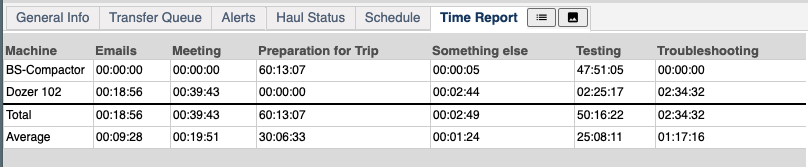
Activity Time Breakdown
Daily Machine Time Breakdown
This report is the breakdown of "Uptime," "Run Time," "Idle TIme," and "GPS Down Time" per day, per machine. It includes the start and stop times for each session the machine was online for each day. It includes a total and average for the machines and dates selected.
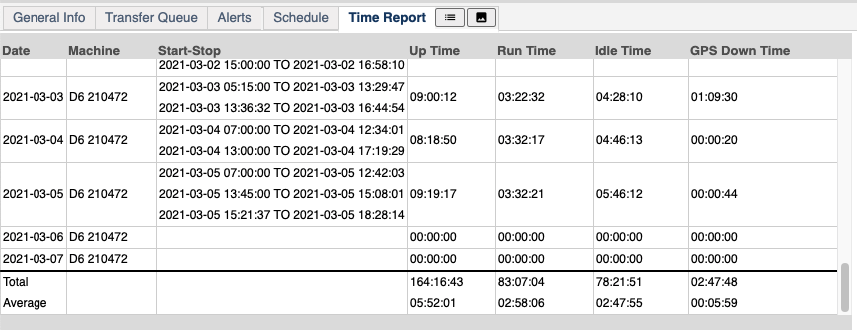
Daily Time Breakdown per Machine
Machine Time Breakdown (Uptime)
This is the classic "Uptime Report." It is a breakdown of all the time metrics in total for each machine over the time period selected.
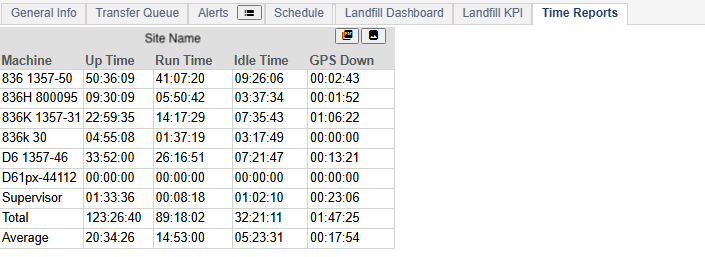
Uptime Report Table
Press the Image icon to open the graph of the data.
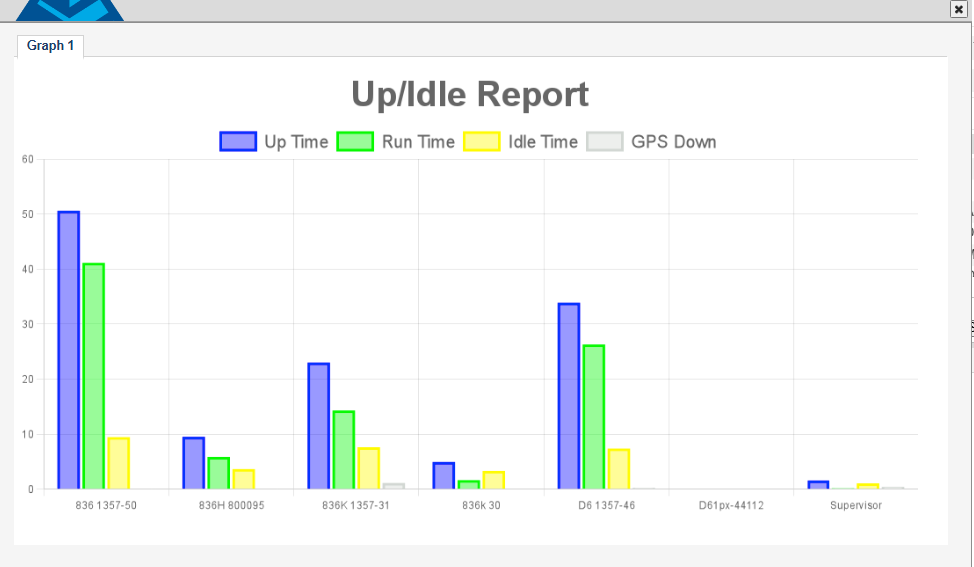
Uptime Report Graph
Press the PDF button to download a PDF of the report.
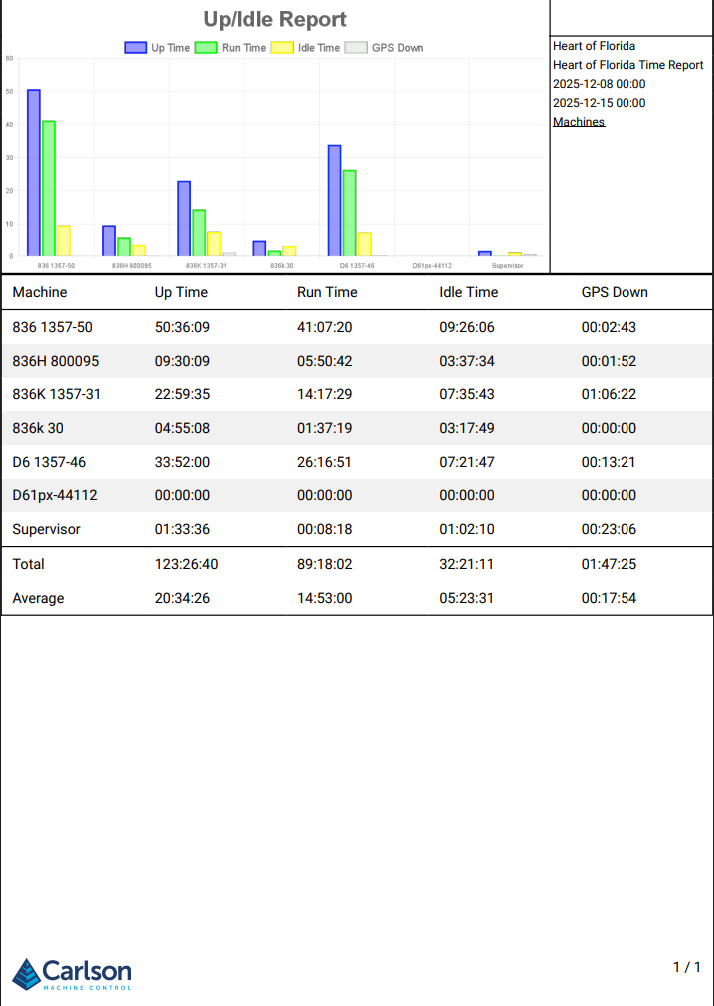
Uptime Report (PDF)
Operator Time Breakdown
This report outputs the amount of time each operator spent running each machine.

Operator Uptime Report